> ## Documentation Index
> Fetch the complete documentation index at: https://docs.searchhub.vip/llms.txt
> Use this file to discover all available pages before exploring further.
# Discord
> Search examples and field explanations for Discord in SearchHub
# Discord — Quick search examples
This page shows compact, copy-pasteable examples of common Discord search fields supported by SearchHub.
***
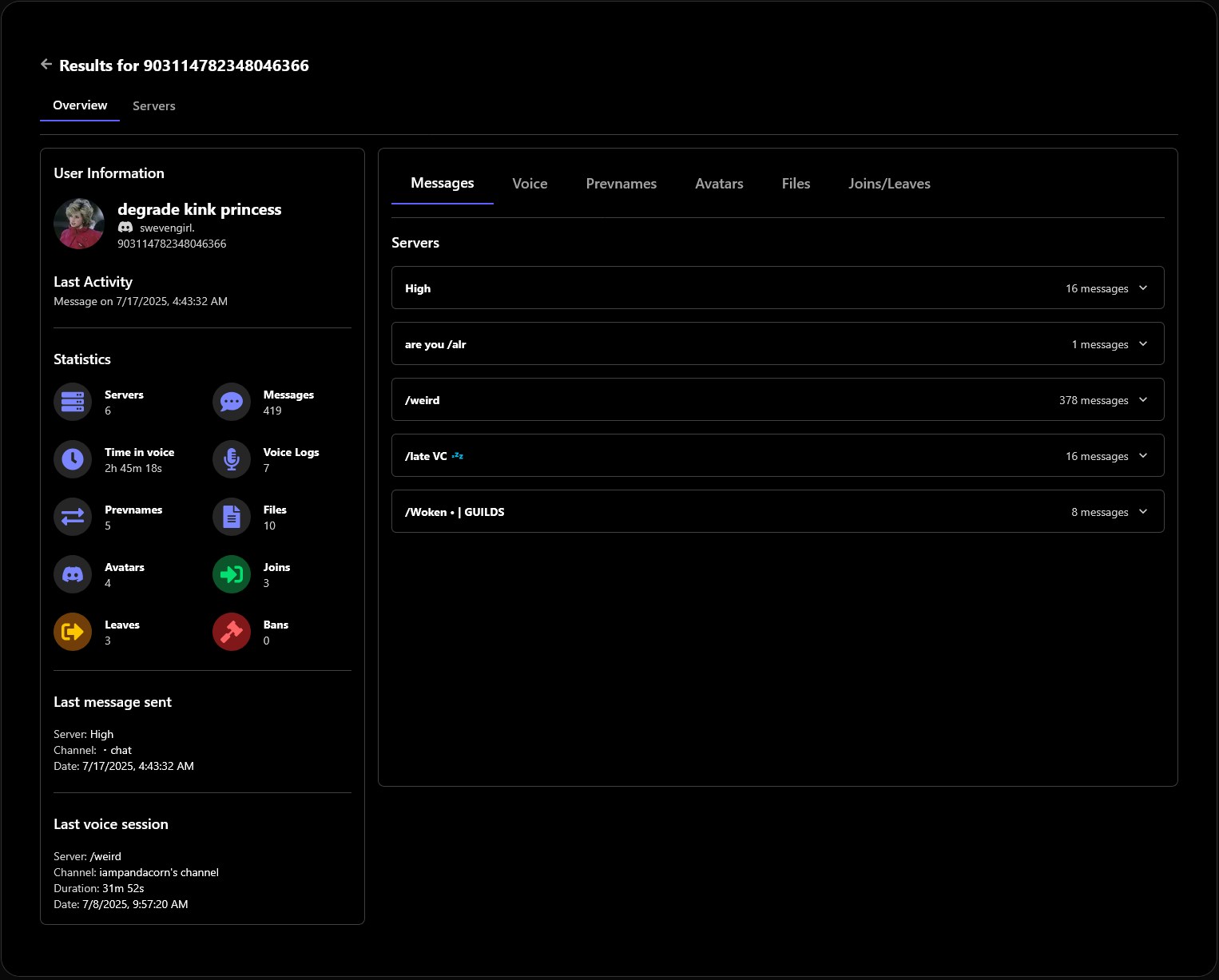
Enter a Discord user ID (numeric) in for the UserView to quickly load that user's profile and messages, voice logs, prevnames, avatars, files, join/leave/ban. Example: `1098175931635482634`
 ## Search in server
Use guild and channel fields to scope queries to a specific server or channel.
```text theme={null}
Search in server
guildname:SearchHub
channelname:chat
channel:1409239333432459354
guild:1038108273703919746
content:someone play roblox?
```
Notes:
* Guild(name) accepts partial or full server names or numeric channel ID.
* Channel(name) can be a channel name or numeric channel ID.
* Content can be text with spaces or not.
***
## User search
Search by username, display name, or user ID.
```text theme={null}
User search
username:daily
displayname:test
author:1098175931635482634
```
Notes:
* Username matches the account handle (case-insensitive).
* Displayname matches the server nickname.
* Use Author:user\_id to find messages from a specific user.
***
## Container (attachments / media)
Filter results that include attachments or specific media types.
```text theme={null}
Container
mention:450320967810678794
has:link
has:image
has:video
has:sound
```
Notes:
* Use Has:video, Has:image, Has:sound, Has:link to filter by media type.
* Use mention to check where a user got pinged.
***
## Global send time filters
Filter messages by exact date or ranges.
```text theme={null}
Global Send Time
date:2025-05-25 00:00
before:2025-05-25 00:00
after:2025-05-25 00:00
```
Notes:
* Date uses YYYY-MM-DD HH:MM.
* Before/After apply exclusive range filters.
***
## Examples of complex queries
Below are ready-to-paste examples that combine fields for realistic investigative searches. Each block includes a short note explaining what it returns.
#### 1) Images from a specific author in the SearchHub server, before a date
```text theme={null}
GuildName:SearchHub Author:1098175931635482634 Has:image Before:2025-06-01
```
Returns image attachments posted by the specified author in the SearchHub server before 2025-06-01.
#### 2) Videos in a specific channel during May 2025
```text theme={null}
Guild:1297902764881477643 Channel:1409239333432459354 Has:video After:2025-05-01 Before:2025-06-01
```
Finds video attachments posted in the given channel between 2025-05-01 and 2025-06-01.
#### 3) Messages mentioning a license-like token and containing links
```text theme={null}
content:license Has:link
```
Good for surface-level scans for shared tokens/keys accompanied by links. Combine with a guild or author to reduce noise.
#### 4) Cross-server username search with optional timeframe
```text theme={null}
Username:testt After:2025-01-01 Before:2025-07-01
```
Searches for the account handle 'testt' across indexed servers within the given date range.
#### 5) High-precision: server + author + attachment type + keyword
```text theme={null}
GuildName:SearchHub Author:1098175931635482634 Has:image content:screenshot
```
Returns messages from the author in the SearchHub guild containing images and the word "screenshot" — useful for visual evidence collection.
* Combine ID fields (Guild, Channel, Author) for deterministic results.
* Use `Has:` to quickly filter attachments.
* Dates use YYYY-MM-DD (add HH:MM if you need exact time).
* Paste examples directly in the dashboard search box to iterate quickly.
## Search in server
Use guild and channel fields to scope queries to a specific server or channel.
```text theme={null}
Search in server
guildname:SearchHub
channelname:chat
channel:1409239333432459354
guild:1038108273703919746
content:someone play roblox?
```
Notes:
* Guild(name) accepts partial or full server names or numeric channel ID.
* Channel(name) can be a channel name or numeric channel ID.
* Content can be text with spaces or not.
***
## User search
Search by username, display name, or user ID.
```text theme={null}
User search
username:daily
displayname:test
author:1098175931635482634
```
Notes:
* Username matches the account handle (case-insensitive).
* Displayname matches the server nickname.
* Use Author:user\_id to find messages from a specific user.
***
## Container (attachments / media)
Filter results that include attachments or specific media types.
```text theme={null}
Container
mention:450320967810678794
has:link
has:image
has:video
has:sound
```
Notes:
* Use Has:video, Has:image, Has:sound, Has:link to filter by media type.
* Use mention to check where a user got pinged.
***
## Global send time filters
Filter messages by exact date or ranges.
```text theme={null}
Global Send Time
date:2025-05-25 00:00
before:2025-05-25 00:00
after:2025-05-25 00:00
```
Notes:
* Date uses YYYY-MM-DD HH:MM.
* Before/After apply exclusive range filters.
***
## Examples of complex queries
Below are ready-to-paste examples that combine fields for realistic investigative searches. Each block includes a short note explaining what it returns.
#### 1) Images from a specific author in the SearchHub server, before a date
```text theme={null}
GuildName:SearchHub Author:1098175931635482634 Has:image Before:2025-06-01
```
Returns image attachments posted by the specified author in the SearchHub server before 2025-06-01.
#### 2) Videos in a specific channel during May 2025
```text theme={null}
Guild:1297902764881477643 Channel:1409239333432459354 Has:video After:2025-05-01 Before:2025-06-01
```
Finds video attachments posted in the given channel between 2025-05-01 and 2025-06-01.
#### 3) Messages mentioning a license-like token and containing links
```text theme={null}
content:license Has:link
```
Good for surface-level scans for shared tokens/keys accompanied by links. Combine with a guild or author to reduce noise.
#### 4) Cross-server username search with optional timeframe
```text theme={null}
Username:testt After:2025-01-01 Before:2025-07-01
```
Searches for the account handle 'testt' across indexed servers within the given date range.
#### 5) High-precision: server + author + attachment type + keyword
```text theme={null}
GuildName:SearchHub Author:1098175931635482634 Has:image content:screenshot
```
Returns messages from the author in the SearchHub guild containing images and the word "screenshot" — useful for visual evidence collection.
* Combine ID fields (Guild, Channel, Author) for deterministic results.
* Use `Has:` to quickly filter attachments.
* Dates use YYYY-MM-DD (add HH:MM if you need exact time).
* Paste examples directly in the dashboard search box to iterate quickly.